
Quick start guide
From zero to invoicing in production in seven steps. Testing is free and you don't need a digital certificate on your server: Ticketbai WS signs and sends the invoices for you.
-
Create your account and get your tokens
Sign up for free and register your company (or your client's). In each company's private area you have two tokens:
- Test token, for
https://api-test.ticketbaiws.eus. Invoices go to the tax authorities' test environments and have no legal validity. - Production token, for
https://api.ticketbaiws.eus. It is activated when you purchase the license.
Every request carries two headers:
TokenandNif(the NIF, Spanish tax ID, of the issuing company). From the NIF, the API knows which tax authority to send to: Araba, Bizkaia, Gipuzkoa or the AEAT (Spanish Tax Agency, for Verifactu).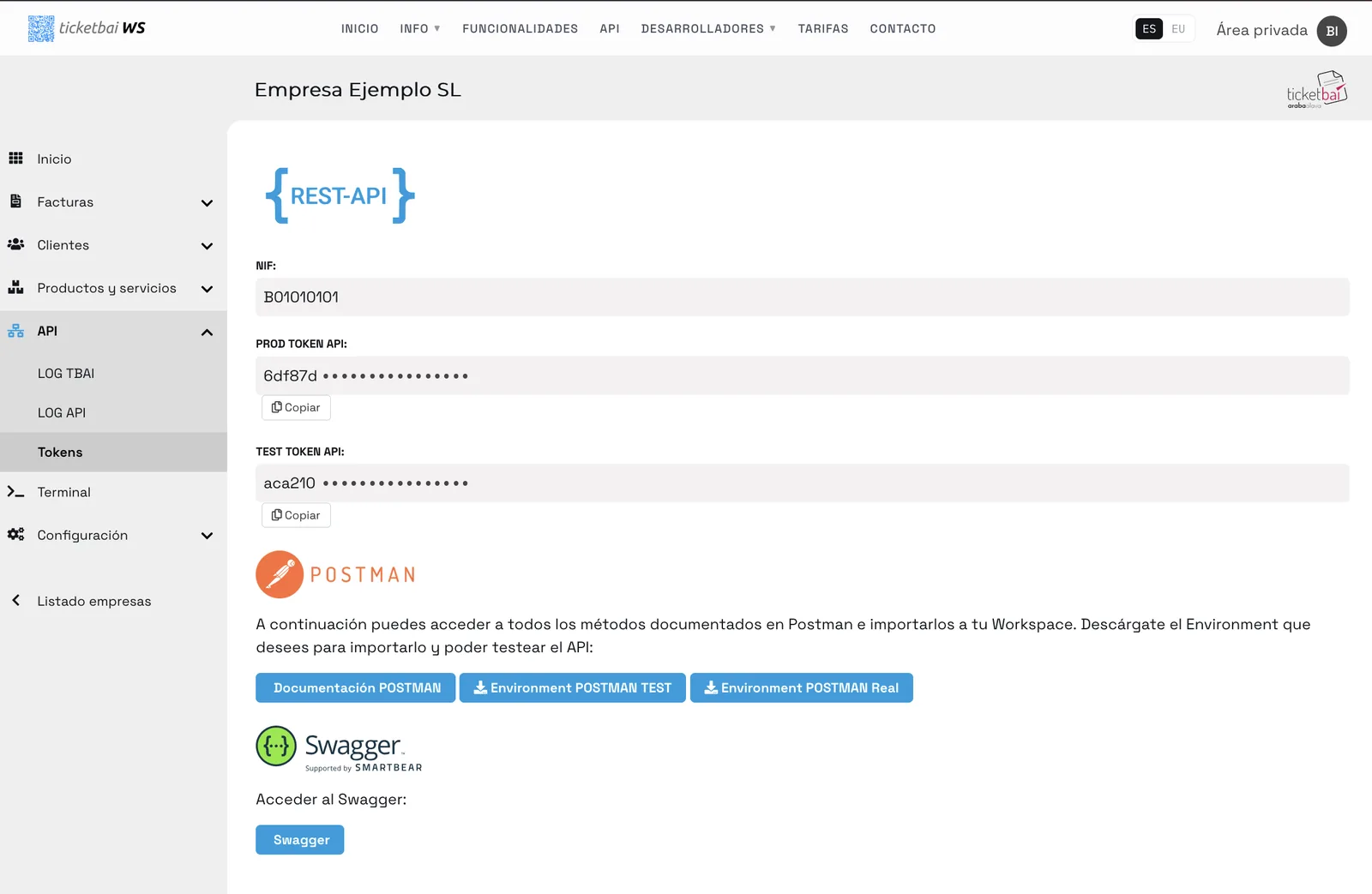
"Área privada" (private area) → API → Tokens: the company's NIF and its production and test tokens, with a button to copy them. From here you can also get the Postman collection and the Swagger file. If you manage many companies (accounting firms, software vendors), you can register them through the API with the Companies and Licenses endpoints.
- Test token, for
-
Send your first test invoice
A simplified invoice (a receipt) is the easiest: it carries no customer data. Replace the token and the NIF with your own:
curl -X POST 'https://api-test.ticketbaiws.eus/tbai/' \
  -H 'Accept: application/json' \
  -H 'Content-Type: application/json' \
  -H 'Token: YOUR_TEST_TOKEN' \
  -H 'Nif: B89670855' \
  --data-binary @- <<'JSON'
{
    "fecha": "29/11/2026",
    "hora": "10:30:00",
    "serie": "T2026",
    "numero": "1024",
    "simplificada": true,
    "lineas": [
        {
            "descripcion": "Café con leche",
            "cantidad": 2,
            "importe_unitario": 1.3636,
            "tipo_iva": 10,
            "tipo_req": 0
        },
        {
            "descripcion": "Pintxo de tortilla",
            "cantidad": 1,
            "importe_unitario": 2.7273,
            "tipo_iva": 10,
            "tipo_req": 0
        }
    ],
    "total_factura": 6.0
}
JSON
<?php // composer require ticketbaiws/ticketbaiws-php require 'vendor/autoload.php'; $tbai = new \TicketbaiWS\Client('YOUR_TEST_TOKEN', 'B89670855', ['entorno' => 'test']); $r = $tbai->crearFactura([ 'fecha' => '29/11/2026', 'hora' => '10:30:00', 'serie' => 'T2026', 'numero' => '1024', 'simplificada' => true, 'lineas' => [ ['descripcion' => 'Café con leche', 'cantidad' => 2, 'importe_unitario' => 1.3636, 'tipo_iva' => 10, 'tipo_req' => 0], ['descripcion' => 'Pintxo de tortilla', 'cantidad' => 1, 'importe_unitario' => 2.7273, 'tipo_iva' => 10, 'tipo_req' => 0], ], 'total_factura' => 6.0, ]); if ($r->isError()) { throw new RuntimeException($r->getMessageText()); } // $r->getData('qr') is the QR code PNG in base64, to print on the invoiceimport json import requests data = json.loads(r""" { "fecha": "29/11/2026", "hora": "10:30:00", "serie": "T2026", "numero": "1024", "simplificada": true, "lineas": [ { "descripcion": "Café con leche", "cantidad": 2, "importe_unitario": 1.3636, "tipo_iva": 10, "tipo_req": 0 }, { "descripcion": "Pintxo de tortilla", "cantidad": 1, "importe_unitario": 2.7273, "tipo_iva": 10, "tipo_req": 0 } ], "total_factura": 6.0 } """) r = requests.request( "POST", "https://api-test.ticketbaiws.eus/tbai/", headers={"Token": "YOUR_TEST_TOKEN", "Nif": "B89670855", "Accept": "application/json"}, json=data, timeout=30, ) response = r.json() if response["result"] == "ERROR": raise Exception(response["msg"]) print(response["return"])const data = { "fecha": "29/11/2026", "hora": "10:30:00", "serie": "T2026", "numero": "1024", "simplificada": true, "lineas": [ { "descripcion": "Café con leche", "cantidad": 2, "importe_unitario": 1.3636, "tipo_iva": 10, "tipo_req": 0 }, { "descripcion": "Pintxo de tortilla", "cantidad": 1, "importe_unitario": 2.7273, "tipo_iva": 10, "tipo_req": 0 } ], "total_factura": 6.0 }; const r = await fetch("https://api-test.ticketbaiws.eus/tbai/", { method: "POST", headers: { "Accept": "application/json", "Content-Type": "application/json", "Token": "YOUR_TEST_TOKEN", "Nif": "B89670855", }, body: JSON.stringify(data), }); const response = await r.json(); if (response.result === "ERROR") throw new Error(response.msg); console.log(response.return);using System.Net.Http; using System.Text; var json = """ { "fecha": "29/11/2026", "hora": "10:30:00", "serie": "T2026", "numero": "1024", "simplificada": true, "lineas": [ { "descripcion": "Café con leche", "cantidad": 2, "importe_unitario": 1.3636, "tipo_iva": 10, "tipo_req": 0 }, { "descripcion": "Pintxo de tortilla", "cantidad": 1, "importe_unitario": 2.7273, "tipo_iva": 10, "tipo_req": 0 } ], "total_factura": 6.0 } """; using var http = new HttpClient(); var request = new HttpRequestMessage(new HttpMethod("POST"), "https://api-test.ticketbaiws.eus/tbai/") { Content = new StringContent(json, Encoding.UTF8, "application/json") }; request.Headers.Add("Token", "YOUR_TEST_TOKEN"); request.Headers.Add("Nif", "B89670855"); var response = await http.SendAsync(request); Console.WriteLine(await response.Content.ReadAsStringAsync());{ "fecha": "29/11/2026", "hora": "10:30:00", "serie": "T2026", "numero": "1024", "simplificada": true, "lineas": [ { "descripcion": "Café con leche", "cantidad": 2, "importe_unitario": 1.3636, "tipo_iva": 10, "tipo_req": 0 }, { "descripcion": "Pintxo de tortilla", "cantidad": 1, "importe_unitario": 2.7273, "tipo_iva": 10, "tipo_req": 0 } ], "total_factura": 6.0 }The response arrives in milliseconds, with the TBAI identifier, the QR code as a PNG (base64) and the verification URL:
{
    "result": "OK",
    "return": {
        "huella_tbai": "TBAI-B89670855-291126-j7MuFGnhmY+e6-062",
        "qr": "iVBORw0KGgo… (PNG en base64)",
        "url": "https://tbai.egoitza.gipuzkoa.eus/qr/?id=TBAI-B89670855-291126-j7MuFGnhmY%2Be6-062&s=T2026&nf=1024&i=6&cr=003"
    },
    "msg": null
}
Print the QR code and the TBAI identifier on the invoice (for Verifactu, the QR code and the «VERI*FACTU» legend). It is mandatory.
No account yet? Try this same request in the test terminal.
-
Check that the tax authority accepted it
By default the API responds immediately and sends the invoice to the tax authority in the background, with automatic retries if the tax authority does not respond. To find out the final result you have three options:
- Webhooks (recommended): we notify you when an invoice goes from pending to OK or to ERROR. If you only care about problems, create it with
solo_errores. - Query:
GET /tbai/with series and number returns the status and the tax authority's response. - Dashboard: the submission log in the private area shows every submission, the generated XML and the Provincial Council's response.
If you prefer to wait for the tax authority within the request itself, add
"sincrono": true. In Verifactu, without that parameter the response isPENDING.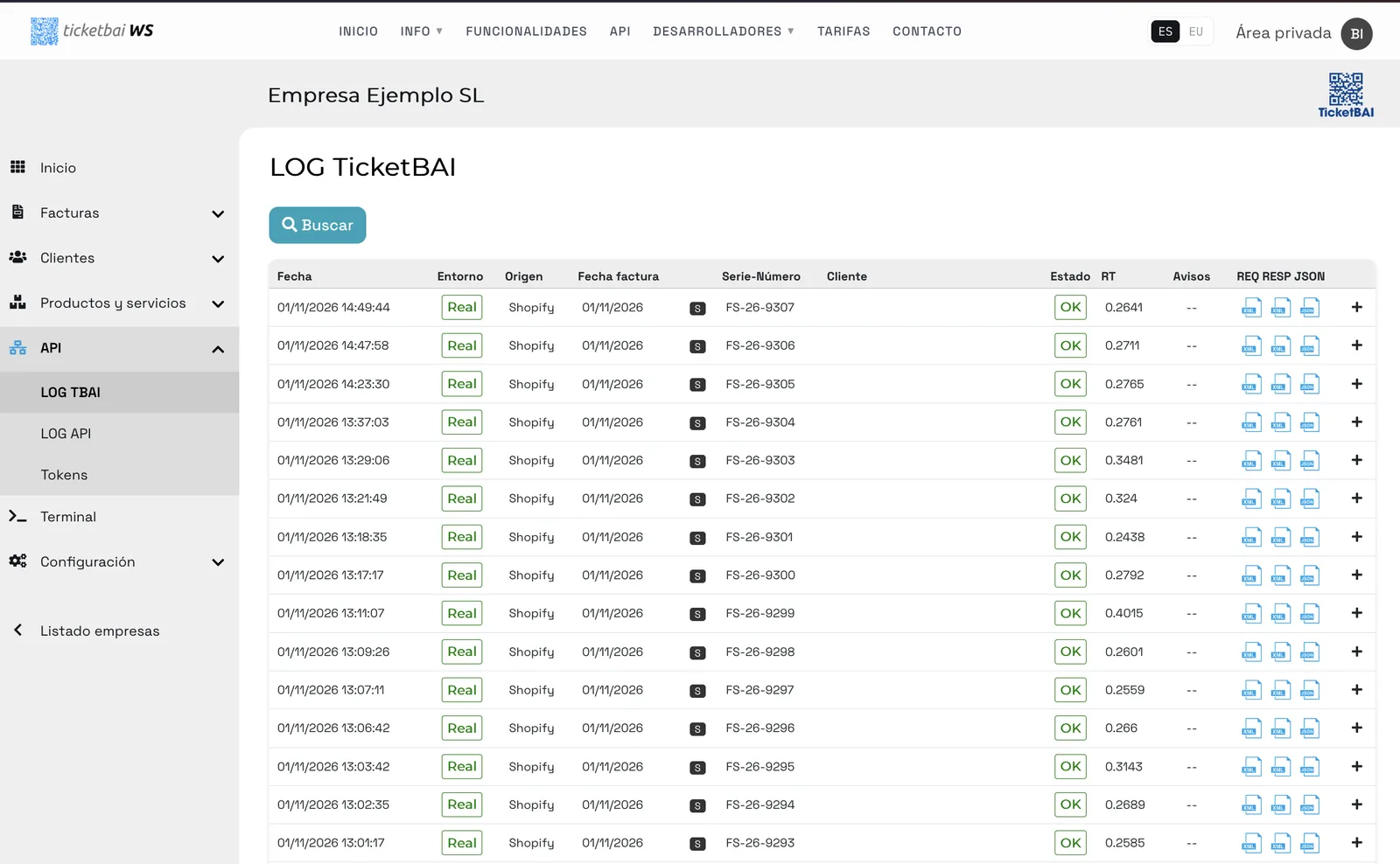
"Área privada" (private area) → API → "LOG TBAI": each submission to the tax authority with its environment, its source, the status and the response time. The icons open the request, the tax authority's response and the JSON received. 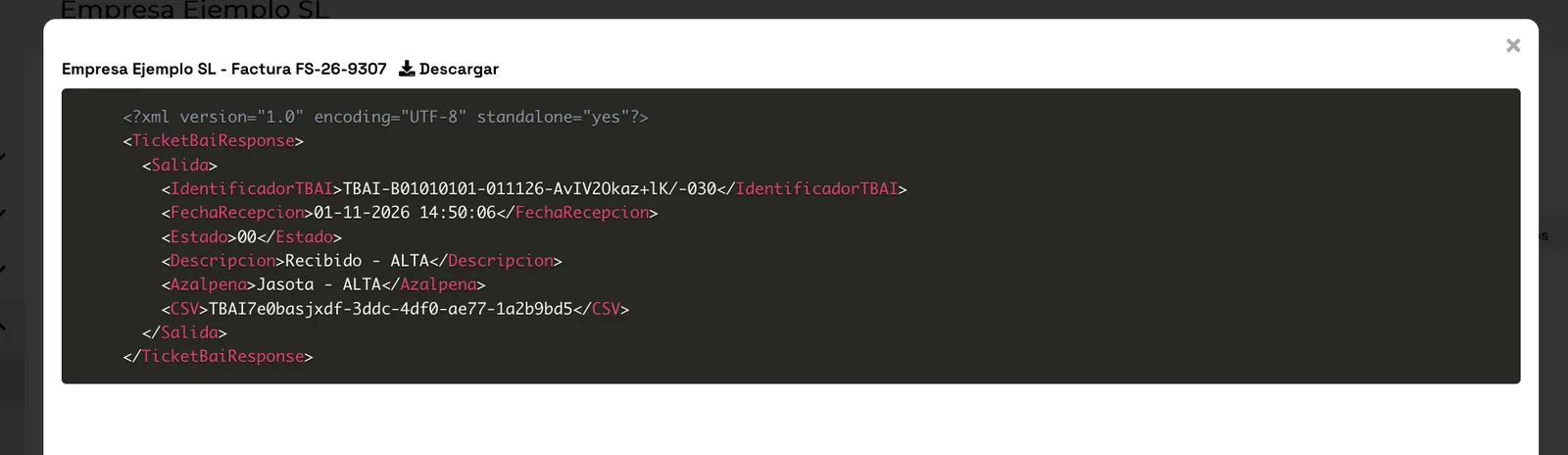
Tax authority response to an accepted invoice: status 00 ("Recibido", received), the TBAI identifier and the CSV. - Webhooks (recommended): we notify you when an invoice goes from pending to OK or to ERROR. If you only care about problems, create it with
-
Test your business cases
Before going live, send to the test environment the invoices you will actually issue: with and without a customer, corrective invoices, refunds, foreign customers, exempt transactions… The examples page has the JSON for each case.
Remember:
- The API returns HTTP 200 for errors too: always check
result(OK,PENDINGorERROR) and showmsgto the user. - Numbering must be consecutive within each series, and the date and time must be those of the actual issue.
- Each territory has a submission deadline: Araba accepts invoices from the last 24 hours, Gipuzkoa from the last 7 days, and Bizkaia up to the 25th of the month following the quarter (January 31 for the fourth quarter).
- To correct an invoice that has already been sent, don't send it again: use a corrective invoice, a resubmission (
zuzendu) or a cancellation, depending on the case.
- The API returns HTTP 200 for errors too: always check
-
Authorize Ticketbai WS with your tax authority
To send in production on your behalf, your tax authority needs to know we do so with your permission. It depends on the territory:
TICKETBAIAraba
Register the Ticketbai WS device certificate on the website of the Provincial Council of Álava (Diputación Foral de Álava). Here is the device certificate registration guide
BATUZBizkaia
Sign the representation document (authorization to act on the company's behalf) that we provide. You don't need to attach a copy of your ID card.
TICKETBAIGipuzkoa
Sign the representation authorization that we provide in the private area.
AEATVerifactu
Sign the representation document. You can download it and upload it signed from the private area or through the API (Representation document endpoints).
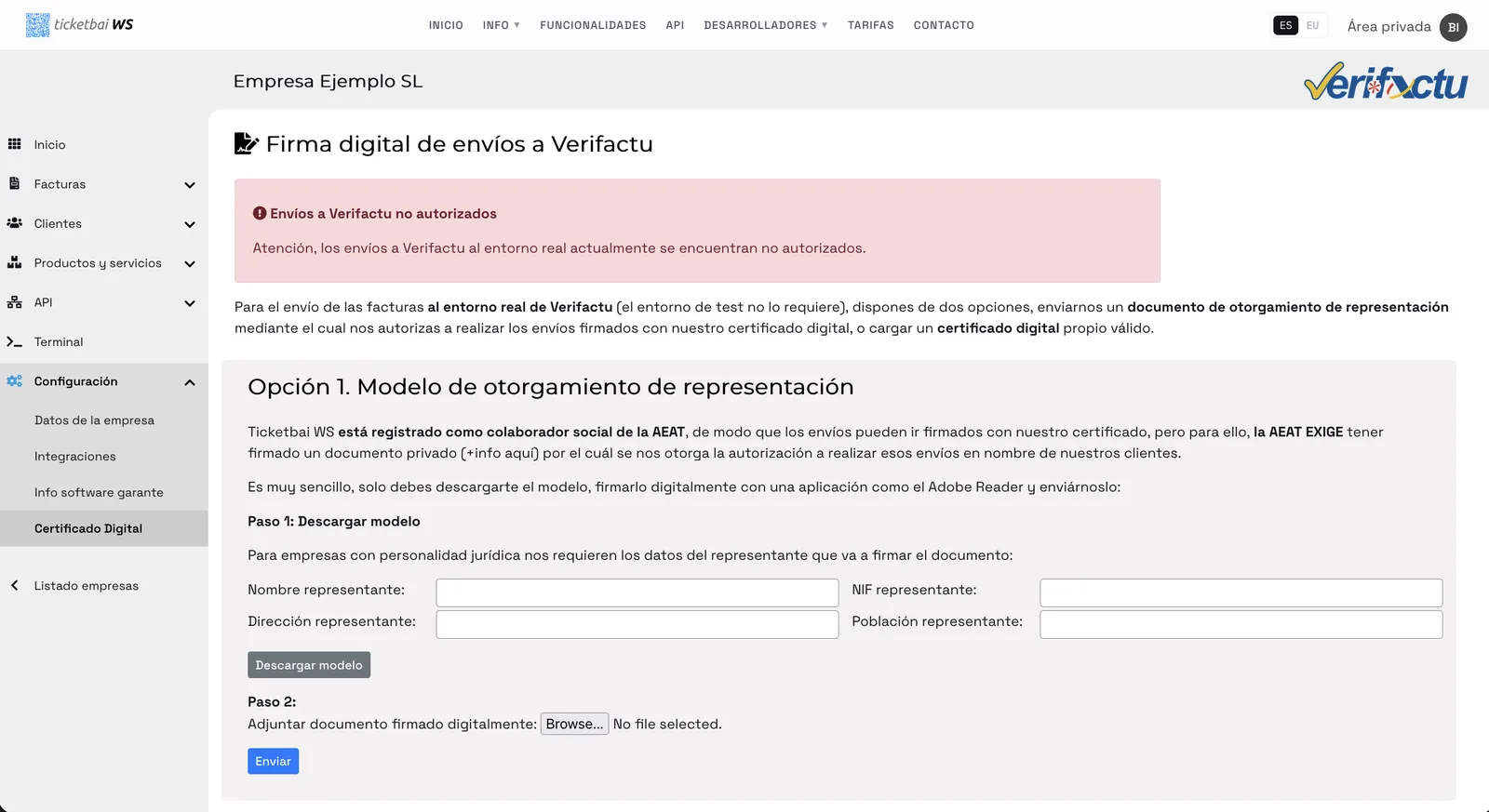
"Área privada" (private area) → "Configuración" (settings) → "Certificado Digital" (digital certificate), Verifactu example: fill in the representative's details, download the template, sign it digitally and upload it. You can also upload your own certificate. -
Purchase the license and go live
Choose the plan that fits your volume. To go live, only two things change:
Test Production Base URL https://api-test.ticketbaiws.eushttps://api.ticketbaiws.eusTokenheaderTest token Production token The request and response formats are the same. Store both in your application's configuration so you can switch environments without touching the code.
Are you a reseller or do you integrate several clients? Contact us for partner terms.
-
Before your first real invoice
- Store the fingerprint, the URL and the QR code of each invoice in your database: you will need them to reprint it.
- Register a webhook in production too so you hear about any rejection (test and production webhooks are independent; you can try it first on api-test).
- If your POS can go offline, plan for it: the invoice is sent as soon as the connection is back, within the territory's deadline.
- Check the service status if you notice slowness: it shows in real time how our API and each tax authority are responding.